Black LED Channels For Staircase

2024 5 Best Staircase Lighting Aluminum Channels

Adding lighting to the staircases or steps is necessary, especially when the main lights are turned off at night. The oft lighting on steps lets you see the steps clearly in the dark without bringing unnecessary danger. Today let us share you the 5 best aluminum channels for staircase lighting in 2024.

Handrail LED Channels
  1. Handrail LED Channels

These handrail LED channels have an up-and-down lighting design, so they are easy to mount on the wall beside the staircase. The standard length is 2 meters per piece, but they can be cut to any size for your projects. They are made of extruded aluminum and look modern and luxurious, with a black powder-coated surface treatment.

These big LED profiles can work as handrails. You can hold them when you step on the staircases. The heavy aluminum base can also work as a heat sinker for better heat dissipation for LED lighting. The inner width of the slots is 12.3mm, which allows the max width of strip lights to be 12mm. You can install single-color, dual-white, color-changing, and RGBIC LED strips as the light source. There are 180° connectors available, you can use them to connect for a longer one.

2. Black LED Channels For Steps

Black LED Channels For Steps

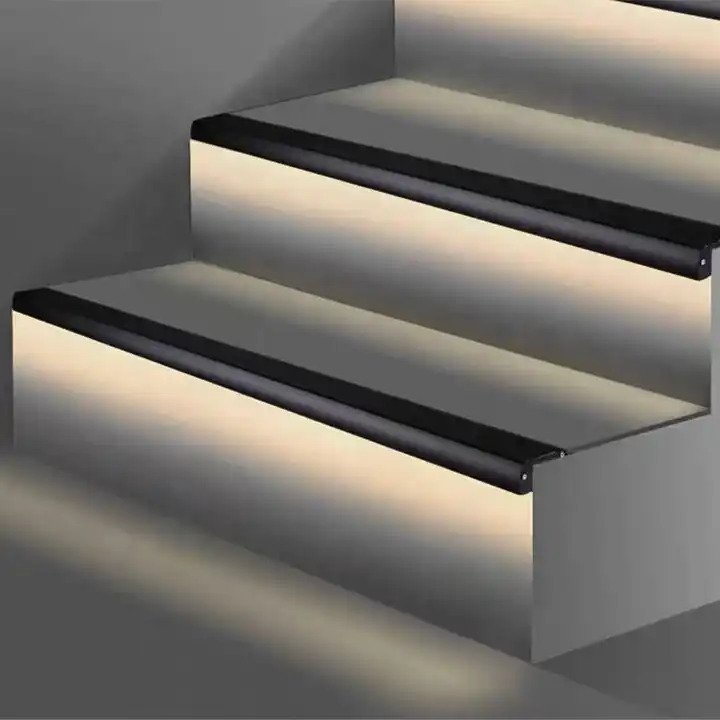
Those black LED channels allow you to mount them on the edge of the steps. The LED profiles have a downward lighting design to create a soft lighting ambiance. They come with PVC anti-skid covers, which allow you to step on them and walk on them without slipping. The stock length of those channels is 2M per piece and can be cut to any size.

Black LED Channels For Staircase

Only PC diffused covers are available. You can install high-density COB LED strips to create continuous dotless lighting. The inner width of the lighting slot is 13.3mm, which allows you to install the max width of strip lights to be 13mm.

Tile Edge Staircase LED Channels

3. Tile Edge Staircase LED Channels

Those LED channels allow mounting on tiles, especially 8mm and 10mm tiles or marbles. The surface has anti-slip grooves, so you don’t have to worry about slipping when you step on it.

The inner width is 13.3mm, and the max width of the strip light is 13mm. You can add waterproof strip lights for outdoor applications. Only PC-diffused covers are available to diffuse the lighting smoothly. The standard length is 2M per piece and can be cut to any size. Three colors are available: black, white, and silver. We can paint them to any color you want.

Side Bendable LED Channels For Curved Steps

4. Side Bendable LED Strip Holder For Curved Steps

Those LED strip holders are designed for steps with curved surfaces and can seamlessly integrate LED strip lights in your staircases. The maximum length is 2M per piece and can be cut to any size you want.

Side Bending Strip Light Holder

Only silicone diffused covers are available for smooth lighting output. The bending diameter is 600mm to ensure a snug fit and uniform illumination along curved surfaces. The inner width is 10.4mm and allows the max width of LED tapes to be 10mm.

Waterproof Corner Silicone LED Profiles

5. V Shape Corner Silicone Waterproof LED Channels

The 45° V-shaped silicone channels are IP67 waterproof and come with metal clips for mounting underneath the steps. The unique 45-degree angle allows for a greater amount of light to be dispersed and creates a unique lighting effect. They are flexible and can be bent to conform to curved or irregular outdoor areas. The standard length is 5M per roll, and the maximum is 50 meters per roll. You can cut to any size to fulfill your project.

Silicone Channel For LED Tape Light

The inner width is 10.8mm, which allows 10mm LED strips to be inserted. To create uniform, smooth, linear lighting, you can add high-density SMD or COB LED strips as the light source, with no light dots and dark areas. You can install them under your outdoor staircases.

Conclusion:

Those LED channels will fulfill your need for all kinds of staircases, indoors or outdoors. You can use them to add lighting on the stairs to create ambient lighting at night.

Adding voltage for LED Strip Lights

How To Fix The Voltage Drop Issue For LED Strips?

When you connect multiple 5-meter light strips in series, you will find that the LEDs closer to the power source are brighter than those farther away. This is a voltage drop issue that causes inconsistent brightness. Today, we will check how to solve this issue.

LED Strips Voltage Drop

What Is Voltage Drop?

When the light strip is connected in series for more than 10 meters, the voltage will decrease when the current passes through many electronic components: LEDs and resistors. For example, if the normal working voltage is 24V, the measured voltage may be only 20V at 15 meters. If the working voltage of the LED is lower than the standard working voltage, it will appear darker to the naked eye compared to the LED closer to the voltage. This is called voltage drop.

How To Solve?

There are three solutions to solve the voltage drop issue.

  1. Connect the LED Strips in parallel.

If you are installing multiple light strips for your project and need them to be uniformly bright, we would recommend connecting them in parallel to a power supply or controller so that all LEDs have the same operating voltage.

Connect LED Strip In Parallel

2. Choose the high-voltage LED Strips

Because the high-voltage light strips have a parallel design of the lamp beads on the circuit, the voltage drop is very unobvious even in long-distance projects, so they are very suitable for outdoor long-distance projects. The maximum lengths can be 50 meters or 100 meters per roll, and they can be connected in series.

3. Add voltage From the Middle Or Other End

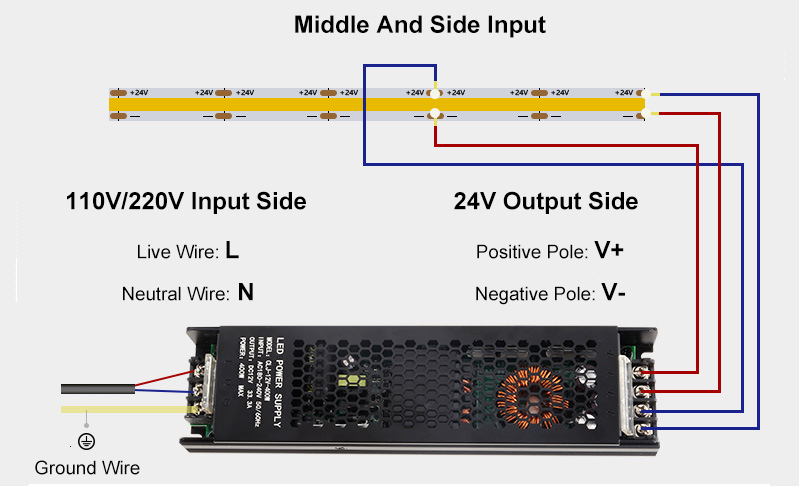
The third solution to fix the voltage drop issue is to add the same voltage from the middle or the other end if the length of the parallel light strip exceeds 10 meters or 15 meters. It is suitable for indoor and outdoor voltage light strip projects. Below is a picture of the wiring diagram for all kinds of connections.

How-To-Fix-Voltage-Drop-Issue

Conclusion

For most users, the method of adding voltage is easiest. No matter how long the light strips are, if you find that the brightness of the LEDs is inconsistent, especially for the high-density COB or SMD LED strips, you can solve this problem by adding the voltage from the middle or the end as shown in our picture.

How To Add Lighting In Your Tile Niche?

Bathroom niche lighting can add functionality and aesthetic appeal to your bathroom space. Niche lighting brings light to areas that can not mount traditional lamps, such as stone walls, stone lanterns, or bathroom niches. Some customers send us emails to ask how to add lighting to the niche in their bathroom. Today, let’s check how to do it.

Bathroom Niche Lighting

To add lighting to your bathroom niche, we need to consider the factors of waterproofing and tiling. This means you need the lighting to be waterproof. The walls are mounted tiles or marble, so we can not drill holes. So we recommend using our tile aluminum channels, which you can recess into the tiles easily. About the light source, you can add high-density dotless COB strip lights as the light source. The LED channels can hold the strip lights properly and protect them from moisture, dust, and damage. It can also be used as a heat sinker for better heat dissipation of LED lights.

What do you need?

  1. Tile Aluminum LED Channels
  2. Waterproof COB LED Strips
  3. LED Power Supply
  4. Light Dimmer(Not necessary)
  5. Wires
  6. Silicone Glue
  7. Screwdriver

Determine the purpose: Before you install the lighting, decide if it is for accent purposes, task lighting, or both.

Choose the type of lighting: LED strip, puck, or recessed lights are popular choices. We will recommend strip lights, because of their energy efficiency and low heat output. Please ensure the width of the strip lights that the aluminum LED channels can hold. If the width of the PCB board is 8mm and the waterproof version is 10mm. So you must ensure the light channel can hold 10mm strip lights.

Select the colors: there are many colors of strip lights available: single color, dual white, RGB, RGBW, RGBWW, RGBIC, RGBWIC, RGBCCTIC, etc.

How do you install them in your bathroom?

  1. Painting cement mortar.
  2. Insert the end caps, then put the profile.
  3. Stick the tile.
  4. Mount the waterproof LED Strips and press in the diffuser, then lead out the power cable.
  5. Seal the wire holes on the end cap with silicone glue.
  6. Run the cable to the power source and connect the power.

Following the steps above, you could add lighting to the niche for your bathroom, which will give you a stylish and practical tile niche with added lighting that enhances the space. You also can add light dimmer or LED controller to control the strip light to adjust brightness or control color for various scenes.

How To Cut The LED Profiles To The Desired Size?

The length of most LED profiles in stock is 2M; in some models, it is 2.5M or 3M, and the maximum length can be 6M. We can help you cut to any size you want for free. But when you want to do it by yourself, the question is, how do you do it yourself?

How to cut LED profiles to your desired size

First, we need to know what material the LED profiles on the market are made of to answer the question. Most LED Light Profiles are made of aluminum, but some are made of silicone or PVC. If they are made of silicone or PVC, you can easily cut them to any size with a knife. But for aluminum channels, it’s a little more complex.

Most aluminum LED channels come with aluminum channels and diffusers. Whether you cut by hand or a machine, it’s important to do it correctly to maintain the aesthetics and functionality. So, let’s check carefully how to do it.

how to cut LED channels

Step 1: Before cutting the LED profiles, carefully measure the length you need. You need to measure the length of the LED profiles and the diffusers. Please remember to leave space for end caps and wires. If the aluminum profiles and diffusers are separate, we recommend assembling them before cutting. We will recommend measuring again before cutting them to avoid any mistakes.

Step 2: Choose the correct tools. You can cut them by hand with a hacksaw with a fine-tooth cutting blade or a compound miter saw.

Step 3: Prepare tools before cutting them. Before you cut them, you need to prepare the necessary tools. If cutting by hand, you will need the items below:

  1. Hacksaw with a fine-tooth cutting blade
  2. pen
  3. measuring tape
  4. masking tape
  5. compound square for angled cuts

If cutting by a power machine, you will need the items below:

  1. Compound miter saw
  2. Masking tape
  3. Pen
  4. Measuring tape
  5. Non-ferrous Carbide Blade For Aluminum Profiles
  6. OBS/Plywood Blade For Diffusers
How to cut LED profiles

How to cut by hand?

  1. Stick the masking tape to the place that you want to cut. It will prevent scratches.
  2. Mark the cutting dimension on the tape.
  3. For the large-size LED Channels, we recommend cutting the aluminum channels and diffusers separately.
  4. Cut them slowly and steadily, ensuring your blade remains straight.
  5. Cut to the size you want.

How to cut by a machine?

  1. Assemble the LED profiles and diffusers for cutting. For the large ones, we will recommend cutting the profiles and diffusers separately.
  2. Mark the cutting point on the diffusers.
  3. Use the electronic tools to cut preciously.
  4. Use a miter saw with a non-ferrous carbide blade for precise and clean cuts.
  5. Remember to wear safety gear when operating the power tools.

By following these steps, you should be able to cut LED profiles to your desired size effectively and safely.

Voice Control Home Lighting

How To Control Your Home Lighting By Voice?

Controlling your home lighting by voice is a convenient and efficient way to manage the ambiance of your living space. By integrating smart home devices such as voice-controlled assistants or intelligent light bulbs, and LED Controllers, you can easily adjust the brightness, color, and scheduling of your lights with simple voice commands. This hands-free approach adds a touch of modernity to your home and enhances your living environment’s overall convenience and comfort. So, say goodbye to traditional light switches and embrace the future of home lighting control with voice commands. Today, let’s check how to control your home lighting via voice.

  1. The first thing you must ensure is that you have voice control input devices; the most popular ones integrated with Google Assistant or Amazon Alexa.
Voice Control Input Devices

2. The second thing you must ensure is that the Smart LED Lights can connect to the voice control devices. Except the LED Lights with WiFi communication modules, otherwise you will need to the Gateways, 2.4G Gateways or Zigbee 3.0 Gateways.

3. The third thing is to add them to the various groups on your phone APP to control them separately or in groups.

Today, we will teach you how to do step-by-step operations to control the LED Strips by voice commands.

For the LED Strips, 3 main types of controllers are available that integrate 2.4G, Zigbee 3.0, or WiFi.

For the 2.4G LED Controllers, you will need the items below:

  1. LED Strips
  2. 2.4G RF LED Controller
  3. Power Supply
  4. 2.4G Gateway
  5. RF Remote Control(Not necessary)
  6. Wires

For the Zigbee 3.0 Controller, you will need the ones below:

  1. Strip Lights
  2. Zigbee 3.0 Controller
  3. LED Driver
  4. Zigbee Gateway
  5. Zigbee Remote Control(Not necessary)
  6. Wires
  7. Connectors

For the WiFi Controller, you will need the items below:

  1. LED Tapes
  2. WiFi LED Controller
  3. LED Power Supply
  4. Remote Control(Not necessary)
  5. Wires
  6. Connectors

There are various types of Strip Lights available; you can consider single-color, tunable white, RGB, RGBW, RGB+CCT, Addressable single color, addressable CCT, RGBIC, addressable RGBW, and addressable RGB+CCT. You can use them for various scenes. The IP20 or IP30 non-waterproof strip lights for indoor use only, and you can consider the IP65, IP67, and IP68 ones for outdoor locations.

How to install them in your space?

  1. Hide the Flexible LED Strips: you can use the IP30 non-waterproof and IP65 surface-coated waterproof LED Strips for indoor applications. The back with double-sided adhesive tape. It’s easy to remove the protector paper and stick it where you want to install them. I recommend adding aluminum LED channels to hold strip lights to achieve a clean and professional look while protecting the strips. The LED Profiles also can work as heat sinkers for better heat dissipation.
  2. Connect to the controller: choose the correct LED Controller for the LED Strips. If the controller can not be paired to the network directly, please add Gateway.
  3. Connect the controller to the LED Power Supply. Various output voltage LED Drivers are available. Before you purchase them, please ensure the output voltage is the same as the working voltage of LED Light Strips. For some short applications, you can also consider using a battery pack or power bank to light up.
  4. After the system is powered on, please test if all parts work well.
  5. Test if you can use voice commands to control the LED Lights.

By these following steps, you can easily control your home lighting using voice commands, adding convenience and flexibility to your living space.

LED Drywall Profiles

July Ledbe Coupon Codes Available

Enjoy great savings on LED products this July with Ledbe’s coupon codes.

Use the code ” Drywall-Channel ” to get 3% off for all drywall LED Channels orders.

As the hottest sale category on our website, the drywall LED Channels are most welcome products for interior lighting applications. You can use them to add cove lighting, indirect lighting on baseboards, lighting on corners, or the Flexible Aluminum Channels to produce Semi-round or circle.

The Drywall Channels are made of 6063-T5 extruded aluminum with anodized surface treatment. The stock length is 2M, 2.5M, or 3M and can be cut to any size suiting your needs. The diffusers, including PC Diffused Covers, OPAL MATTE, Semi-Clear, and Clear, are available, and they provide different lighting transmittance for various scenes. Silver, white, or black colors are available, and other colors are customizable.

How To Solve The Voltage Drop Issue For Flexible LED Strips?

The voltage drop is a common issue; the main reason for the problem is that the Flexible LED Strips run longer runs than 10 meters or 15 meters; the length depends on the quantity of the parts on the LED Strips, which will result in LEDs further from the power source appearing dimmer than those close to it. Today, let’s check how to solve it.

In DC circuits, the voltage gradually drops when it travels along through the LED Strip lights. Many parts, such as LEDs, resistors, and copper PCB boards, will reduce the voltage. The LEDs that are farther away from the power supply will not get enough voltage, which will cause weak brightness. The whole LED Strips look un-uniform lighting.

So, how do we solve the voltage drop issue? There are two solutions to solve the problem.

  1. Connect the Flexible LED Strips to the Controller or Power Supply in parallel with wires, which shortens the distance between the LEDs and the power source. The LEDs on the far ends will get as much voltage without much loss.
  2. Add the same voltage on the middle or the other end.

By following these solutions, you can significantly reduce the voltage drop and ensure that the Strip lights maintain consistent brightness across their entire length to get uniform lighting.

Bendable LED Tape Channel

Flexible Lighting Solutions: Exploring Bendable Aluminum LED Channels

Lighting plays an important role in setting the ambiance and highlighting architectural features of interior design. For some places where we can not mount traditional light fixtures or lamps, we recommend bendable LED channels, especially in curved or irregular areas, which is an exciting advancement that offers both flexibility and functionality. Today let’s explore the Bendable LED Channels.

What are bendable Light Channels?

The bendable aluminum light channels are specially designed housings for LED Strips that can be easily shaped to fit curved surfaces and unconventional angles. Unlike the traditional Aluminum Profiles, they can be bent and molded to follow the contours of any architectural feature, providing a seamless and integrated lighting solution. Constructed from durable aluminum, they also offer excellent heat dissipation, ensuring the longevity and efficiency of the LEDs. Three bendable products are available: left-right bending, up-down bending, and full bending. The stock lengths are 1M, 2M, 3M, and can be cut to any size to suit for your needs. Only one type of diffuser is available: semi-clear, made of high-quality silicone material, which will help diffuse the light evenly. There are various width products available, you can install the Flexible LED Strips on side, on bottom for various applications.

Key benefits:

  1. Versatility In Design

The most significant advantage of the bendable aluminum LED channels is their flexibility. Whether you want to illuminate a spiral staircase, highlight a curved wall, or add accent lighting to an arched ceiling, these Channels can be shaped to fit any design requirement. This flexibility opens up a world of creative possibilities, allowing designers to experiment with light in new and exciting ways.

2. Seamless Integration

The traditional lighting fixtures can often disrupt the visual flow of a space. Bendable LED Profiles, however, allow for seamless integration into the architecture. They can be embedded into walls, ceilings, or floors, creating a clean and uninterrupted line of light that enhances the overall aesthetic without drawing attention to the fixture itself.

3. Enhanced Durability

Constructed from high-quality aluminum, these channels are flexible and durable. They provide robust support for the LED strips, protecting them from damage and ensuring they remain securely in place. The aluminum also acts as a heat sink, dissipating heat away from the LEDs and prolonging their lifespan.

Applications:

The applications for bendable LED extrusions are virtually limitless. Here are a few examples of how they can be used:

  • Architectural Lighting: Highlighting the unique features of a building, such as curved facades or intricate moldings.
  • Accent Lighting: Creating dramatic effects in residential or commercial spaces by illuminating coves, niches, or shelves.
  • Retail Displays: Enhancing product displays with customized lighting that draws attention to specific items or sections.

Installation Tips

While flexible led strip channels offer incredible flexibility, proper installation is key to achieving the desired effect. Here are a few tips:

  1. Plan Your Design: Before installation, sketch out your design and measure the area to determine the length of channels and LED strips needed.
  2. Prepare the Surface: Ensure the surface where the channels will be installed is clean and smooth for optimal adhesion.
  3. Bend Carefully: Bend the channels slowly and gently to avoid kinks or damage. Use a bending tool if necessary for precise angles.
  4. Secure Firmly: Use appropriate mounting hardware or adhesive to secure the channels in place, ensuring they are level and straight.
  5. Test the Lights: Before finalizing the installation, test the LED strips to make sure they function correctly and provide the desired lighting effect.

Conclusion

Flexible LED channels are a game-changing innovation in the field of lighting design. Their flexibility, durability, and seamless integration capabilities make them an ideal choice for various applications. Whether you’re a professional designer or a DIY enthusiast, these channels offer a versatile solution to bring your lighting ideas to life. Embrace the future of lighting and explore the endless possibilities that those aluminum LED channels offer.

How To Hide LED Strips Under Cabinet In Kitchen

How To Hide LED Strip Under Cabinets?

Adding lighting under the cabinets effectively brightens your cabinets, especially the dark corners or edges. It helps to illuminate the countertop workspace, making it easier to see while preparing food or cooking. We recommend using Flexible LED Strips as the light source, which can provide enough brightness and long linear lighting along the edge of the Cabinets. But the question is, how do you hide the LED Strips under cabinets? Because there is a lot of oil smoke, it isn’t easy to mount them on. Working for a long time in that situation will shorten the lifespan of LED Strips. So we recommend using the aluminum channels to hide the LED strips under cabinets.

LED Light Channel Under Cabinet

What’s the benefit of LED Channels?

The LED Strips will be installed on the aluminum base and the surface with a diffuser, which not only conceals the LED Strips but also protects them from dust, rain, moisture, etc. They can also work as a heat sink for better heat dissipation, extending your LED Lights’ lifespan.

Corner Mounted LED Profiles For Under Cabinets

Where can you get them?

You can order the LED Channels for under cabinets from us below:

https://www.ledbe.com/aluminum-led-channels/cabinet-series-led-profiles

LED Channels For Under Cabinets

Products are available in various shapes, colors, and lengths. You can choose the ones that suit your preference.

How to install them?

  1. Mount LED Strips on the LED Channels and install the end caps.
  2. Mount the mounting clips under the cabinets.
  3. Mount the LED Channels on the clips and lead out the power cable of the Strip Lights.
  4. Connect the cable to a power source or light controller.

What LED Strips do you recommend?

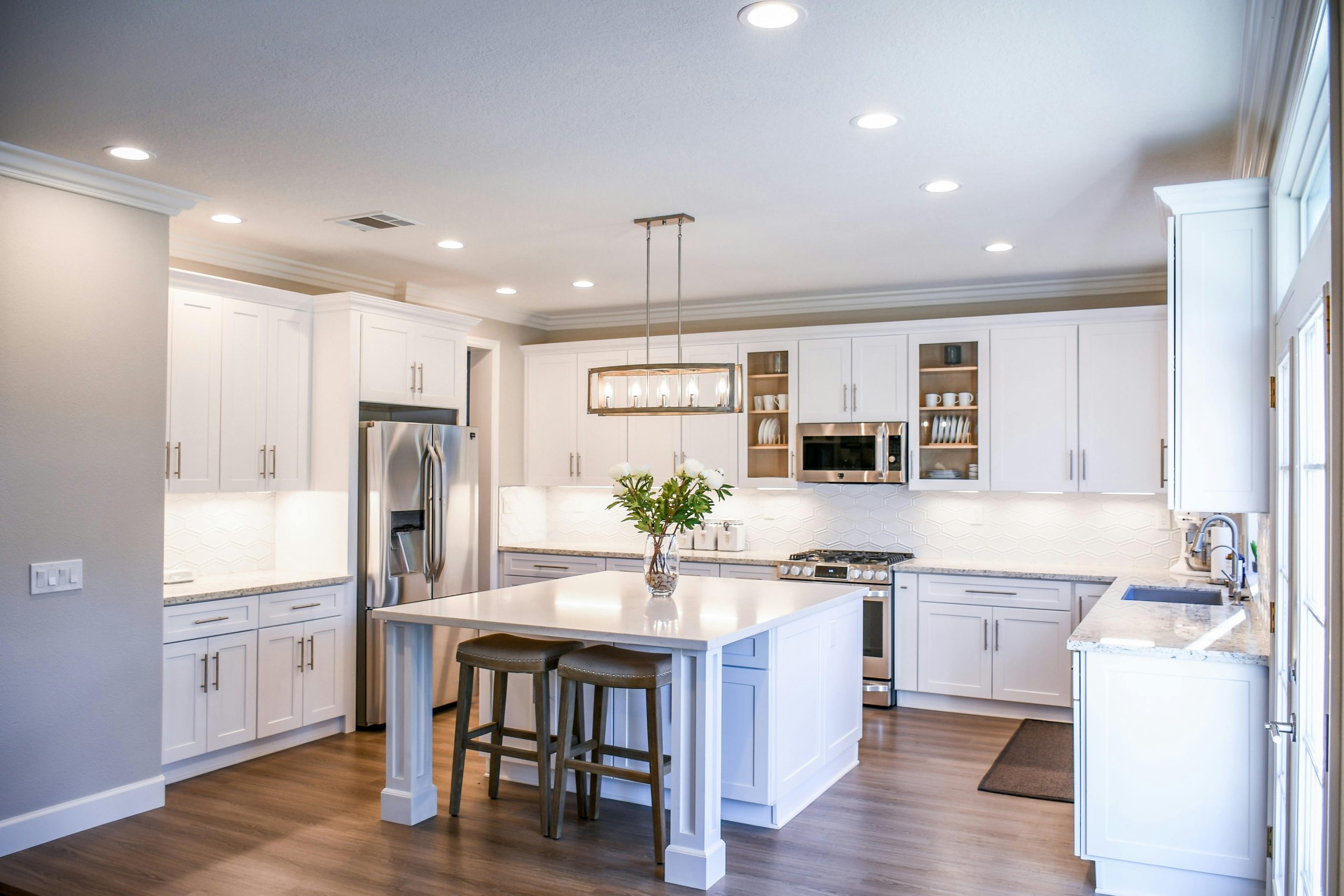
We will recommend the high-density COB LED Strips as the light source; they can create a warm and inviting ambiance in the kitchen and enhance the overall look and feel of the space.

Modern design kitchen

Adding lighting under the cabinet can help to highlight backsplashes or other design features, adding depth and dimension to the room and improving the functionality and appearance of your kitchen.

AC Triac RF Push Dimmer

Newest 500W AC Triac Dimmers In Stock

The MiBoxer newest 500W AC Triac Dimmers are in stock, which can be used to control traditional incandescent lamps, halogen lamps, and triac dimmable LED Lamps. It supports setting up minimum brightness and adjusting the brightness for various scenes. Three versions are available: 2.4G, Zigbee 3.0 + 2.4G, and WiFi + 2.4G. Not only can it be controlled by 2.4G RF Remote Controls, but it can also be controlled by Tuya Smartphone APP and third-party voice commands. All of them support Push dimming.

Dimmer Triac LED
MiBoxer 500W AC Triac Dimmer
Dimmer LED Triac

After pairing it to a 2.4G gateway, the Tuya Smart APP and third-party voice commands can control the TRI-PR. TRI-PZ needs to pair with a Zigbee 3.0 gateway, and TRI-PW does not need a gateway. You can achieve more functions on the APP, like wireless dimming, group control, timing control, one-key execution, automation, etc. If the input voltage is AC110V, the max loading power can not exceed 250W; if the input voltage is AC220V, the power do not exceed 500Watts.

Connection Diagram:

Dimmer Triac 220V

If you want to order MiBoxer AC Triac Dimmers, please check the link below:

https://www.ledbe.com/miboxer-500w-rf-push-ac-triac-dimmer-app-control