What Is The Difference? RGB VS RGBW VS RGBWW.

When you want to order some colorful strip lights for your home, you search on Amazon and will find that you have many choices: RGB, RGBW, RGBWW. So the question is, what is the difference between them?

What the difference of RGB, RGBW, and RGBWW

The difference between the RGB, RGBW, and RGBWW is the number and type of LEDs used.

RGB stands for red, green, and blue and prefers a type of LED Strip that uses three colors to create shades and hues. These Strips are commonly used for decorative lighting and can produce various colors.

RGBW stands for red, green, blue, and white. In addition to the three primary colors, RGBW LED Strips also include a white LED. This allows for a broader range of color options and the ability to create pure white light. There are two structure products available: RGB+White and RGBW 4-In-1.

RGBWW stands for red, green, blue, warm white, and white. These LED Strips will create a softer yellow-white and allow you to adjust the color temperature for various scenes.

You can use the RGB LED Strips to create colorful ambient lighting. And RGBW for brighter ambient lights. RGBWW allows the brightness adjustment and the change of the color temperature from warm white to cool white.

RGB, RGBW, RGBWW LED Strips

How to cut the RGB, RGBW, and RGBWW LED Strips?

The RGB LED Strips have 4 Pins on the PCB board, RGBW has 5 Pins, and RGBWW has 6 Pins. You can cut to the size you want from the copper cutting point.

How To Let Music LED Controller More Sensitivity?

How To Let The Music LED Controller More Sensitivity?

Recently some customers asked to us, they ordered the Music LED Controllers from other companies before, but works not good as expected. to check with us to see if we could provide a better LED Music Controller. OK, if we see music and controller characters, we will know that they want the emitting color of the RGB LED Strips will change automatically follow the beats of music, they need one Music LED Controller that will have better performance. so we will introduce one and check how to install.

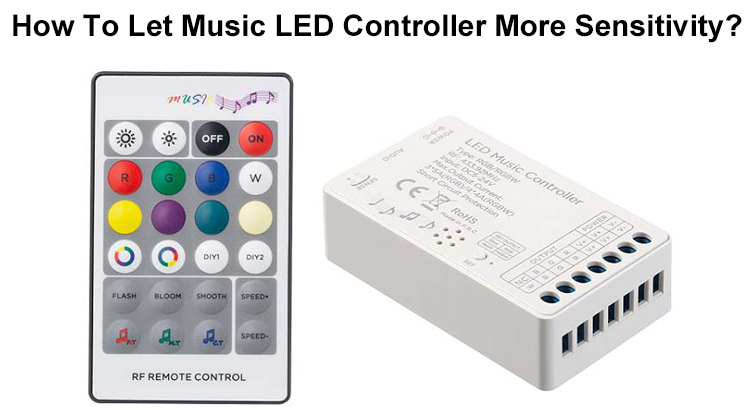
LED Music Controller With 24 Keys RF Remote

This LED Music Controlled was produced by Hoion, which is a Chinese company and focused on producing high-quality LED Controllers, LED Dimmers, Amplifiers, DMX and Dimming Drivers. the model of the Music LED Controller is HX-DA01, which with small size and comes with 24 keys RF Remote Control. with 3 or 4 output channels design and supports RGB or RGBW LED Lights, there is a button on the LED Controller, if the LED indicator light flash slowly means working in RGB model or working in RGBW model, the max output current is 5A when in RGB mode, 4A in RGBW mode. the side with a voice sensitivity dial and audio input jack, you can press the dial to adjust the sensitivity, the audio input jack allows to connect to your phone, PC or other audio devices.

RGB Sound LED Controller

Why is the Music LED Light Controller not good as you expected?

If you use the audio input method to get the audio signal, you can avoid the signal reduction and noise signal mixed. so if you want the colors of the color-changing LED Strips change automatically follow the beats, choose the audio input Music LED Controllers.

below we will introduce what you need and how to connect the LED Music Controller to the Strip Light and LED Driver, and how to operate the LED Controller.

  1. What do you need?

1*Music LED Controller With RF Remote Control

LED Music Controller

1*RGB LED Strips(60LEDs/Meter, IP20)

24V RGB LED Strip Lights

1*LED Driver(IP20 350W)

24V 350W LED Driver

1*Audio Wire with 3.5mm Connector

3.5mm Audio Wire

How To Connect them together?

  1. Connect the LED Strips and LED Driver to the LED Music Controller.

Wires On RGB LED Strips

there are blue, green, red and white wires on the 24V RGB LED Strips, you can insert the blue wire into the “B” output port, green wire to “G” output port, red wire to “R” output port and white wire to the V+ output port.

RGB LED Strip Wires

2. Connect the LED Music Controller to A LED Driver

Connect LED Music Controller To LED Driver

3. Power On The LED Controller.

Power On The Music LED Controller

there is a LED Indicator Light on the LED Controller, if it flashes slowly means working in RGB mode, if flashes quickly means working in RGBW mode. you can press the small round button to switch the working mode from RGB to RGBW.

4. Connect the LED Sound Controller to A PC

Connect the LED Music Controller To A PC

On the left side there is a sensitivity adjustable dial, you can rotate it to adjust the sensitivity to music.

How does It work?

  1. With Audio Input

2. Without Audio Input

in the video, you can see that the LED Music Controller became more sensitive after being connected to the PC. so if you want to purchase a Music LED Controller, we will recommend the one with an audio input jack.